Mastering Software Integration: A 5-Step Guide for Seamless Operations

Mastering software integration involves a structured 5-step approach to connect disparate systems, ensuring data consistency and streamlining workflows for enhanced operational efficiency and business growth.
In today’s fast-paced digital landscape, the ability to connect disparate software systems is not just an advantage; it’s a necessity. This guide on software integration guide offers a practical, 5-step framework designed to help businesses achieve seamless operations, foster better data flow, and unlock new levels of efficiency.
Understanding the Core of Software Integration
Software integration is the process of bringing together different types of software subsystems or applications so that they can function as a unified system. This unification enables diverse applications to communicate, share data, and work in concert, eliminating redundant data entry and improving overall data accuracy. It’s about breaking down silos within an organization’s digital infrastructure, allowing information to flow freely and processes to be automated efficiently.
The complexity of modern business operations often means relying on multiple specialized software solutions, from CRM and ERP systems to marketing automation and accounting platforms. Without proper integration, these systems operate independently, leading to inefficiencies, errors, and a fragmented view of business performance. Effective integration, however, transforms this patchwork into a cohesive, powerful ecosystem that supports informed decision-making and agile responses to market changes.
At its heart, software integration aims to enhance operational efficiency, reduce manual efforts, and provide a holistic view of business data. This foundational understanding is crucial before embarking on any integration project, setting the stage for strategic planning and successful execution. It’s about recognizing that the sum is greater than its parts when software systems are designed to work together harmoniously.
Step 1: Comprehensive Planning and Strategy Definition
The initial phase of any successful software integration project is thorough planning and strategic definition. This isn’t merely about identifying which systems need to connect; it’s about understanding the ‘why’ behind the integration and aligning it with broader business objectives. A well-defined strategy acts as a roadmap, guiding decisions and ensuring that the integration effort delivers tangible value.
Identifying Business Needs and Goals
Before any technical work begins, organizations must clearly articulate their business needs. What specific pain points will integration address? Are you looking to automate a particular workflow, improve customer data accuracy, or gain better insights into sales performance? Defining these goals precisely helps in prioritizing integration efforts and measuring success.
- Automate workflows: Streamline repetitive tasks to free up human resources.
- Improve data consistency: Ensure all systems operate with the same, accurate information.
- Enhance reporting: Consolidate data for comprehensive business intelligence.
- Boost customer experience: Provide faster, more personalized service through unified data.
Assessing Current Infrastructure and Systems
A detailed audit of existing software infrastructure is critical. This involves cataloging all current applications, understanding their functionalities, data structures, and existing integration capabilities. It also includes evaluating the technical skills of your team and identifying any potential limitations or dependencies that might impact the integration process. This assessment helps in selecting the most appropriate integration approach and tools.
The planning phase also involves defining key performance indicators (KPIs) that will be used to evaluate the success of the integration. Without clear metrics, it’s challenging to determine if the project has met its objectives. This strategic foresight ensures that the integration is not just a technical exercise but a value-driven initiative that contributes directly to business growth and efficiency.
Step 2: Detailed Analysis and Requirements Gathering
Once the strategic plan is in place, the next crucial step involves a deep dive into analysis and requirements gathering. This phase translates the high-level business goals into specific, actionable technical requirements. It’s where the intricacies of data flow, system interactions, and user expectations are meticulously mapped out.
Mapping Data Flows and System Interactions
Understanding how data moves between systems is paramount. This involves creating detailed data flow diagrams that illustrate which data elements are exchanged, when, and under what conditions. It’s essential to identify the source of truth for each piece of data to prevent inconsistencies and ensure data integrity across all integrated applications. This mapping also highlights potential bottlenecks or areas where data transformation might be necessary.
- Identify data sources: Pinpoint the primary system for specific data types.
- Define data formats: Understand how data is structured in each system.
- Specify data transformations: Determine if data needs to be converted for compatibility.
- Outline synchronization schedules: Decide how often data will be updated between systems.
Defining Technical and Functional Requirements
This stage involves documenting both the functional and non-functional requirements of the integration. Functional requirements describe what the integrated system must do, such as synchronizing customer records or automating invoice generation. Non-functional requirements cover aspects like performance, security, scalability, and usability, ensuring the integrated solution meets operational standards and user expectations. Engaging stakeholders from various departments is vital during this phase to capture all perspectives and ensure the solution addresses diverse needs.
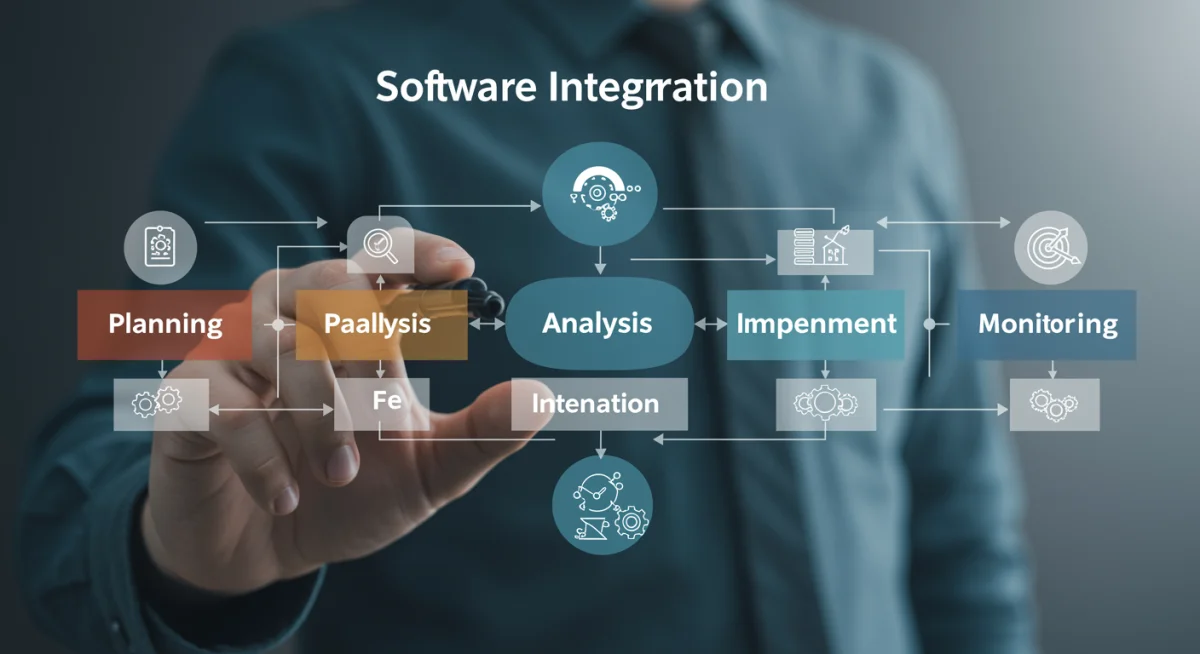
The thoroughness of this analysis directly impacts the success of the subsequent design and implementation phases. Any overlooked requirement or misunderstanding of data structures can lead to significant rework and delays. Therefore, investing ample time and resources in this step is a wise decision that pays dividends throughout the project lifecycle.
Step 3: Solution Design and Architecture Selection
With a clear understanding of requirements, the third step focuses on designing the integration solution and selecting the appropriate architecture. This involves choosing the right tools and technologies that will facilitate the seamless communication between software systems, ensuring scalability, security, and maintainability.
Choosing the Right Integration Architecture
Several integration architectures exist, each with its strengths and weaknesses. Common approaches include point-to-point integration, hub-and-spoke, Enterprise Service Bus (ESB), and API-led connectivity. The choice depends on the number of systems to be integrated, the complexity of data transformations, and the organization’s future growth plans. A well-chosen architecture can significantly reduce future complexity and costs.
Selecting Integration Tools and Technologies
The market offers a wide array of integration tools, from iPaaS (Integration Platform as a Service) solutions to custom-coded APIs. iPaaS platforms like MuleSoft, Dell Boomi, or Zapier provide pre-built connectors and visual interfaces that can accelerate development, while custom APIs offer maximum flexibility for unique integration scenarios. The selection should consider factors such as ease of use, cost, scalability, security features, and compatibility with existing systems.
- API-led connectivity: Modern approach promoting reusability and agility.
- Enterprise Service Bus (ESB): Centralized platform for messaging and transformation.
- Point-to-point integration: Direct connections, suitable for few systems, but can become complex.
- iPaaS solutions: Cloud-based platforms offering pre-built connectors and managed services.
This design phase also includes considerations for error handling, monitoring, and security. How will failures be detected and managed? How will the integration be monitored for performance and data flow? What security protocols are needed to protect sensitive data during transit and at rest? Addressing these questions upfront ensures a robust and reliable integration solution that can withstand real-world operational demands.
Step 4: Implementation and Testing Strategies
The implementation phase is where the design comes to life, involving the actual development of connectors, APIs, or configurations within the chosen integration platform. However, implementation is only half the battle; rigorous testing is equally critical to ensure the integrated systems perform as expected and maintain data integrity.
Developing and Configuring Integrations
This step involves writing code for custom integrations, configuring pre-built connectors within an iPaaS, or setting up rules within an ESB. Best practices include modular development, version control, and clear documentation. Each integration component should be developed with reusability and maintainability in mind, facilitating future updates and troubleshooting. Collaboration between development teams and business stakeholders is essential to ensure the implemented solution accurately reflects the gathered requirements.
Executing Comprehensive Testing
Testing is not a single event but a continuous process throughout implementation. It typically includes several stages:
- Unit testing: Verifying individual components or modules function correctly.
- Integration testing: Ensuring different integrated systems communicate and exchange data accurately.
- System testing: Validating the entire integrated solution against functional and non-functional requirements.
- User Acceptance Testing (UAT): Business users validate the solution meets their needs in a real-world scenario.
Thorough testing helps identify and rectify issues before they impact live operations, minimizing risks and ensuring a smooth transition. It’s crucial to test not only happy paths but also edge cases, error conditions, and high-volume scenarios to ensure the robustness and reliability of the integration. A well-executed testing strategy is the cornerstone of a successful software development project, providing confidence in the deployed solution.
Step 5: Deployment, Monitoring, and Ongoing Optimization
The final stage of mastering software integration extends beyond initial deployment to continuous monitoring and optimization. Integration is not a one-time project; it’s an ongoing process that requires vigilance and adaptation to evolving business needs and technological advancements.
Strategic Deployment and Rollout
Deployment involves moving the integrated solution from a test environment to production. This should be done strategically, often in phases, to minimize disruption to live operations. A clear rollback plan should always be in place in case unforeseen issues arise. Communication with end-users about changes and providing adequate training are also vital for successful adoption.
Continuous Monitoring and Performance Management
Once deployed, the integrated systems must be continuously monitored. This includes tracking data flow, system performance, error rates, and security events. Monitoring tools provide real-time insights, allowing teams to quickly identify and address any issues before they escalate. Performance metrics should be regularly reviewed against the KPIs defined in the planning phase to ensure the integration continues to deliver expected value.
- Real-time dashboards: Visualize data flow and system health.
- Automated alerts: Notify teams of errors or performance degradation.
- Log analysis: Investigate root causes of issues.
- Security audits: Regularly check for vulnerabilities and compliance.
Iterative Optimization and Evolution
The digital landscape is constantly changing, and so are business requirements. Integrated solutions must be flexible enough to evolve. This means regularly reviewing the integration’s effectiveness, gathering feedback from users, and identifying opportunities for optimization. Whether it’s adding new data points, integrating additional systems, or improving performance, ongoing optimization ensures the integration remains a valuable asset that supports the organization’s strategic objectives. This iterative approach ensures the integration solution remains relevant and efficient over its lifecycle.
| Key Integration Step | Brief Description |
|---|---|
| Planning & Strategy | Define business goals and assess infrastructure to create a clear integration roadmap. |
| Analysis & Requirements | Map data flows and gather detailed functional and technical requirements. |
| Design & Architecture | Select the best integration architecture and tools for scalability and security. |
| Implementation & Testing | Develop connectors and rigorously test the integrated solution for accuracy and performance. |
Frequently Asked Questions About Software Integration
Software integration offers numerous benefits, including improved operational efficiency, reduced manual data entry and errors, enhanced data accuracy, better decision-making through consolidated insights, and increased flexibility to adapt to changing business needs. It streamlines workflows and fosters collaboration across departments.
The timeline for a software integration project varies significantly based on its complexity, the number of systems involved, and the chosen integration method. Simple integrations might take weeks, while complex enterprise-level projects could span several months or even a year. Thorough planning helps optimize this timeline.
Common challenges include data inconsistency, security concerns, compatibility issues between different systems, lack of skilled personnel, managing the complexity of diverse data formats, and ensuring scalability. Overcoming these requires meticulous planning, robust testing, and continuous monitoring.
Absolutely. Small businesses can greatly benefit from software integration by automating tasks, reducing operational costs, improving customer service, and gaining competitive advantages. Even integrating a few key applications can yield significant improvements in efficiency and productivity.
APIs (Application Programming Interfaces) are fundamental to modern software integration. They act as a set of rules and protocols that allow different software applications to communicate with each other. APIs enable secure and efficient data exchange, facilitating seamless interaction between disparate systems without requiring direct access to their internal workings.
Conclusion
Mastering software integration through a structured 5-step approach is indispensable for businesses aiming to thrive in the digital age. By meticulously planning, analyzing, designing, implementing, and continuously optimizing integration solutions, organizations can unlock unparalleled operational efficiencies, improve data accuracy, and foster a truly connected enterprise. This systematic methodology not only addresses immediate challenges but also lays a robust foundation for future growth and technological evolution, ensuring that systems work harmoniously to support strategic objectives.